Clinic Room to Rent: Building a Page That Fills Your Spare Rooms

Overview
A clinic room to rent page turns empty hours into income by attracting visiting professionals who need trusted clinical space. This article covers what the page must include, from room details and availability to the practicalities renters actually search for, how to write it for two audiences at once, and how to make sure the rental offer supports rather than confuses the patient-facing side of the clinic website.
Key takeaways
- Empty clinic rooms are an asset a single page can put to work.
- Renters search for practical details, so lead with them.
- The page serves professionals, but it must not confuse patients.
- Trust signals matter to renters as much as to patients.
- Clear enquiry routes and simple terms convert interest into bookings.
While planning a new clinic website, one requirement sat apart from the rest. Alongside pages for patients, the owners wanted a page offering consulting rooms to other professionals, because the building had more space than the core team could use. It is a common situation: clinics carry rooms that sit empty for parts of the week while independent practitioners nearby search for exactly that kind of space.
A dedicated rental page can connect the two. Here is what it needs to work, and how to keep it from muddying the rest of the site.
What a clinic room to rent page needs
The core of the page is practical: what rooms exist, what they contain, when they are available and how hiring works. Professionals comparing spaces want specifics, such as room size, clinical equipment, waiting areas and reception support. Vague descriptions force an enquiry just to learn the basics, and many browsers will not bother. The more questions the page answers upfront, the more serious the enquiries that arrive.
Who is actually searching
The audience for room hire is varied: independent practitioners starting out, established clinicians adding a location, and allied professionals needing clinical space for part of a week. What they share is a need for trust. Hiring a room in a respected clinic lends credibility they could not buy elsewhere. Write the page for a capable professional making a business decision, not for a patient seeking care.
Lead with the practical details
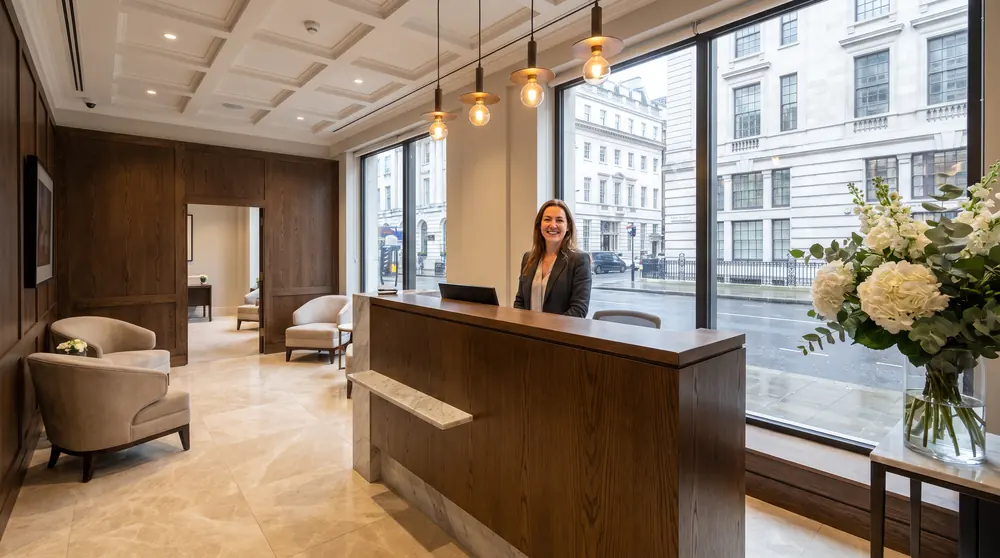
List each room or room type with its facilities, availability patterns and the support included, such as reception cover or waiting space. Photographs matter enormously here, because a renter is imagining their own patients in the space. Clean, well-lit, honest images of the actual rooms outperform generic interior photography, and they spare everyone the awkwardness of a viewing that does not match the pictures.
Show the building, not just the room
Renters are buying the whole experience their patients will have: the entrance, the waiting area, the reception greeting, accessibility and parking or transport links. Describe the journey from the front door to the consulting room. These surroundings are often the reason a professional chooses one clinic over another at a similar rate, because their own reputation rides on how the visit feels.
Make the terms easy to grasp
Explain how hiring works in plain terms: sessional or daily arrangements, what is included, how booking and cancellation operate, and who to speak to. You need not publish every number, but the structure should be clear enough that an enquirer knows what they are asking about. Complicated or hidden arrangements are the single biggest source of stalled conversations with otherwise keen renters.
Keep patients and renters apart
The rental page serves a different audience from the rest of the site, so keep it clearly separated in navigation, usually under a label such as room hire for professionals. Patient journeys should never route through it, and its tone can be more commercial than clinical pages. Done well, the page is easy for the right people to find and invisible to everyone else. Thoughtful site structure makes that separation natural.
Let the page earn search visibility
Professionals searching for clinical space use plain, practical phrases, often including their area. A well-written page that names the kind of space, the setting and the location naturally can rank for those searches and bring enquiries with no advertising cost. It is one of the clearest examples of a page that pays for itself, because each new regular renter represents recurring income from a single piece of content.
Use trust signals that speak to professionals
Renters assess a clinic the way patients do, only with sharper eyes. Evidence of good governance, well-kept facilities and a professional team reassures them that the environment will reflect well on their own practice. Mention the standards the building is run to and the support renters receive. A professional renting a room is lending you their reputation, and they want to see that it is safe with you.
Make enquiring effortless
End the page with one obvious route: a short enquiry form or a named contact, asking only for what you need to respond usefully. Promise a response time and keep it. Professionals judge a clinic by how it handles the first exchange, and a prompt, organised reply suggests the whole arrangement will run the same way. Slow or vague responses send good renters straight to the next building.
Review the page as occupancy changes
Availability shifts as rooms fill, so revisit the page regularly. Keep it current about what can be booked, and when occupancy is high, use the page to collect a waiting list rather than letting it quietly mislead. An accurate page builds confidence; an outdated one wastes everyone’s time and starts relationships with an apology.
Treat the first few renters as research as well as revenue. Ask what convinced them, what nearly put them off and what they compared you against, then fold the answers back into the page. A rental page refined this way usually reaches the point where it fills rooms faster than the clinic can free them.
A rental page is one way a clinic website earns beyond patient bookings. Our companion article on the doctor profile looks at the other side of the coin: professionals who rely on rented visibility instead of owning their own.
Frequently asked questions
What should a clinic room to rent page include?
The essentials are the rooms available, their facilities and typical availability, photographs of the actual spaces, a description of the building and support included, a plain explanation of how hiring works and a simple enquiry route with a named contact.
The test is whether a professional could decide to enquire seriously without needing a phone call just to learn the basics.
Who rents consulting rooms in private clinics?
A wide mix: independent practitioners building a practice, established clinicians adding a convenient second location, and allied health professionals who need clinical space a few sessions a week.
They differ in specialty but share the same priorities, which are a trustworthy setting, predictable availability, fair terms and an environment their own patients will find reassuring.
Will a room hire page confuse patients on our website?
Not if it is clearly separated. Give it a distinct label aimed at professionals, keep it out of patient journeys and let the main navigation focus on care. Patients rarely click into a page that is obviously not for them.
The audiences only blur when rental messaging leaks onto treatment pages, so keep each page single-minded about who it serves.
Do photographs really matter for room rental?
They are often decisive. A renter is picturing their own patients walking into the space, so honest, well-lit photographs of the real rooms, waiting area and entrance answer the question words cannot. Generic or borrowed imagery creates doubt and leads to viewings that disappoint.
Good photography also signals that the clinic takes presentation seriously, which reflects on everything else.
Should we publish prices for room hire?
You can succeed either way, but structure should always be clear even if numbers are not. Explain whether rooms are hired by session or by day and what is included, then invite an enquiry for current rates.
What loses renters is opacity about how the arrangement works at all, because professionals comparing several options simply move to the clinic that explains itself.
Can a room rental page bring enquiries through search?
Yes, and often quickly, because professionals search with practical, specific phrases and few clinics build proper pages for them. A page that naturally describes the space, the setting and the area can rank well against thin competition.
Each enquiry it produces costs nothing, and a single long-term renter found this way can justify the page many times over.